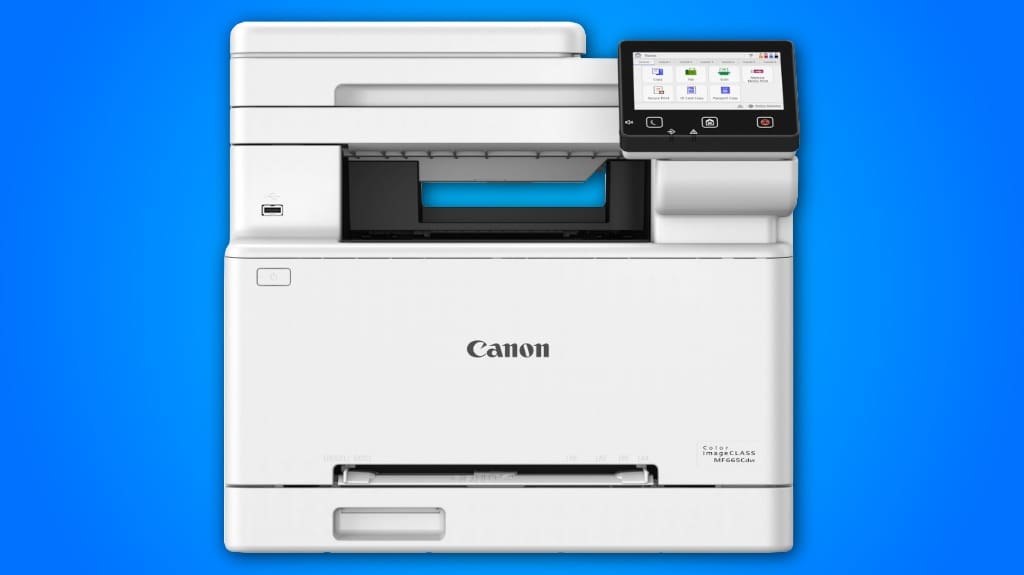
The Canon Color ImageClass MF665CDW is designed to boost your productivity with its sleek build and user-friendly interface. It delivers impressive print speeds of up to 26 pages per minute and features a 5-inch color touchscreen for easy navigation. The automatic duplex printing saves paper, while the 50-sheet ADF simplifies multi-page tasks. With ENERGY STAR certification, you can rely on its eco-friendly performance. Explore more about its document handling capabilities and mobile printing options.
Some Key Points
- The Canon Color Imageclass MF665CDW features a sleek design with a user-friendly 5-inch color touchscreen for easy navigation and operation.
- It offers impressive print speeds of up to 26 pages per minute, with a quick first print time of approximately 10.3 seconds.
- High-capacity Canon Genuine Toner 075 ensures exceptional clarity and high-quality output for both color and monochrome printing tasks.
- The printer includes a 250-sheet standard cassette and a 50-sheet duplex Automatic Document Feeder, enhancing document handling capabilities.
- It is ENERGY STAR certified and supports seamless wireless printing, making it an eco-friendly and convenient option for home and office use.
Overview of Features
When you consider the Canon Color imageCLASS MF665Cdw, you'll find a range of features designed to enhance productivity and streamline your workflow. Its sleek design aesthetics not only make it visually appealing but also contribute to its user-friendly interface. The robust build quality guarantees longevity, making it a reliable addition to your office. With an intuitive 5-inch color touchscreen, accessing essential functions becomes effortless. The printer supports various mobile printing options, adding convenience. Additionally, its automatic duplex printing helps reduce paper waste. Overall, this all-in-one device is engineered to meet your printing, scanning, copying, and faxing needs efficiently.

Print Performance Analysis
The Canon Color imageCLASS MF665Cdw delivers impressive print performance that caters to both color and monochrome needs. With a print speed of up to 26 pages per minute, you won't find yourself waiting long for your documents. The quick first print time of approximately 10.3 seconds guarantees efficiency, especially in busy environments. When it comes to toner quality, the high-capacity Canon Genuine Toner 075 provides exceptional clarity and vibrancy, yielding high-quality output for all your printing tasks. This combination of speed and quality makes the MF665Cdw a reliable choice for any office setting, enhancing productivity without compromising on results.
User-Friendly Interface
One standout feature of the Canon Color imageCLASS MF665Cdw is its user-friendly interface, designed to improve your printing experience. The 5-inch color touchscreen navigation allows you to effortlessly access various functions, making it simple to manage your tasks. You’ll appreciate the intuitive layout as it guides you through frequently used features via the application library. Whether you’re printing, scanning, or copying, the interface streamlines your workflow. Additionally, the easy wireless setup guarantees that connecting your devices is a breeze, further enhancing your overall usability. With these features, you'll find operating the MF665Cdw to be both efficient and enjoyable.
Document Handling Capabilities
Building on the user-friendly interface, the Canon Color imageCLASS MF665Cdw excels in document handling capabilities, making it a strong contender for both home and office use. With a 250-sheet standard cassette and a 1-sheet multipurpose tray, you have ample capacity for various printing tasks. The 50-sheet duplex Automatic Document Feeder (ADF) guarantees efficient processing, allowing you to handle multi-page documents with ease. Additionally, the auto 2-sided printing feature reduces paper usage, enhancing your overall paper handling efficiency. These capabilities streamline your workflow, making the MF665Cdw an effective solution for busy environments.
Environmental Standards
While considering environmental impact, the Canon Color imageCLASS MF665Cdw stands out due to its ENERGY STAR certification and EPEAT Silver rating. These credentials reflect its commitment to sustainability practices and eco friendly design. This printer minimizes energy consumption without compromising performance, making it an excellent choice for environmentally-conscious users. Its automatic duplex printing further reduces paper waste, promoting efficient resource use. By choosing this model, you’re not just investing in a high-quality printer; you’re also supporting a product designed with the planet in mind. The MF665Cdw effectively balances performance with responsible environmental stewardship, making it a smart choice for your office.
Compatibility and Connectivity Options
The Canon Color imageCLASS MF665Cdw excels not only in its environmental credentials but also in its compatibility and connectivity options. You’ll appreciate the seamless wireless printing functionality, allowing you to print from virtually anywhere in your home or office. The printer supports mobile compatibility through the Canon PRINT app, Apple AirPrint, and Mopria Print Service, making it easy to print directly from your smartphone or tablet. With a simple wireless setup process, you can quickly connect your devices. Overall, the MF665Cdw guarantees a versatile and user-friendly experience, catering to your modern printing needs effortlessly.

What Is the Warranty Coverage for the Canon MF665CDW?
The warranty coverage for the Canon MF665Cdw is three years. During this period, you’ll have access to various support options, ensuring you receive assistance for any issues that may arise. This warranty not only covers parts and labor but also offers peace of mind, knowing that Canon stands behind their product. Make sure to register your printer to take full advantage of the warranty benefits and support services available to you.
How Does the Canon MF665CDW Handle Different Paper Sizes?
The Canon MF665Cdw excels in paper handling with its 250-sheet standard cassette and a 1-sheet multipurpose tray, accommodating various paper sizes. You'll appreciate the automatic document feeder, which processes 50 sheets duplex efficiently. This versatility enhances your print quality, ensuring that documents come out crisp and professional, regardless of the size. By automatically adjusting settings for different media, it simplifies your printing tasks while maintaining high standards.
What Are the Dimensions and Weight of the Printer?
The printer specifications for the Canon Color imageCLASS MF665Cdw show it measures 18.1 inches in depth, 15.4 inches in width, and 15.4 inches in height. Weighing around 56.7 pounds, it's essential to take into account size comparison with other models when choosing a suitable space. This weight and size make it a robust option for office environments, balancing functionality and footprint effectively while still being manageable for setup and relocation.
Can the Printer Send and Receive Faxes Directly?
Yes, the printer offers fax functionality, allowing you to send and receive faxes directly. You’ll appreciate the convenience of having an all-in-one device that handles printing, scanning, copying, and faxing without needing additional machines. Its Automatic Document Feeder (ADF) makes faxing multi-page documents efficient, too. Plus, with its user-friendly interface, you can easily navigate the fax features, ensuring seamless communication for your business or personal needs.
What Types of Toner Cartridges Are Compatible With This Model?
For this model, you'll need Canon Genuine Toner cartridges specifically designed for the MF665Cdw. The compatible toner types are the Canon 075/075 cartridges, which guarantee high-quality prints and peak performance. These cartridges are engineered to work seamlessly with the printer, providing consistent results and high page yields. When selecting toner cartridges, always prioritize compatibility to maintain the printer's efficiency and effectiveness in your printing tasks.