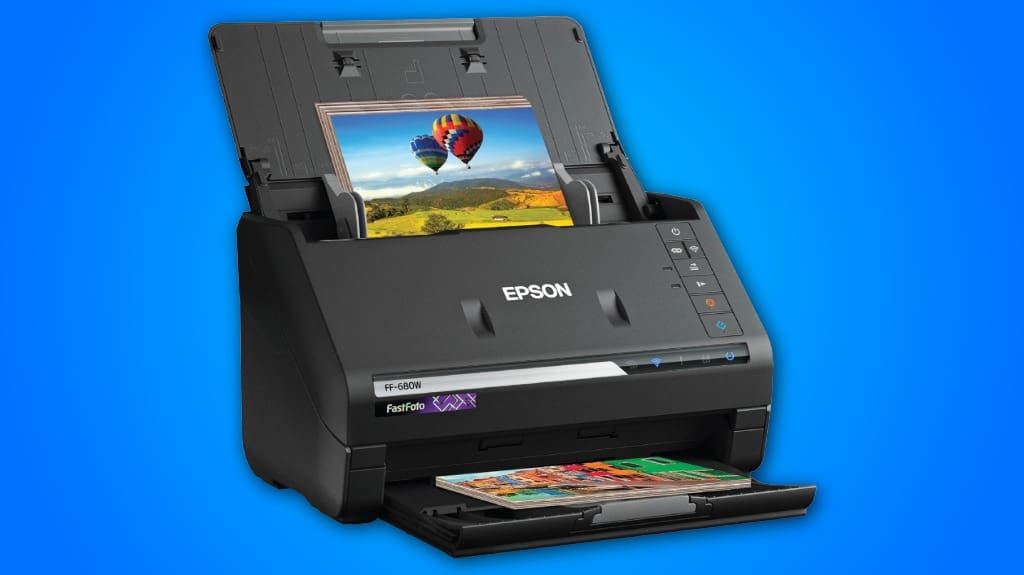
The Epson FastFoto FF-680W offers impressive scanning speed and efficiency, handling one photo per second at 300 dpi and batch scanning up to 36 photos. Its Perfect Picture Imaging System enhances your image quality with color restoration and red-eye reduction. With versatile scanning options from mobile use to different resolutions, it fits diverse needs. The user-friendly interface and wireless connectivity streamline your workflow. If you're looking for a thorough feature set, there's more to uncover about this scanner.
Some Key Points
- The Epson FastFoto FF-680W scans photos at an impressive speed of one photo per second, ensuring efficiency for large batches.
- It features advanced photo restoration capabilities, including color restoration and red-eye reduction, enhancing image quality.
- Users can choose from multiple scanning resolutions, making it versatile for sharing, archiving, or enlarging images.
- The scanner's wireless setup and connectivity options streamline the scanning process and improve user experience.
- With document scanning speeds of up to 45 pages per minute, it's ideal for both personal and professional use.
Scanning Speed and Efficiency
When it comes to scanning speed and efficiency, the Epson FastFoto FF-680W stands out as a game changer, boasting the title of the world's fastest personal photo scanner. You’ll appreciate its ability to scan thousands of photos at an impressive rate of one photo per second at 300 dpi. Its user-friendly interface simplifies batch scanning, allowing you to process up to 36 photos simultaneously. This efficiency doesn't compromise scanning accuracy, ensuring that each image retains its quality. With document scanning speeds reaching up to 45 ppm, it’s designed for those who value both speed and precision in their scanning tasks.

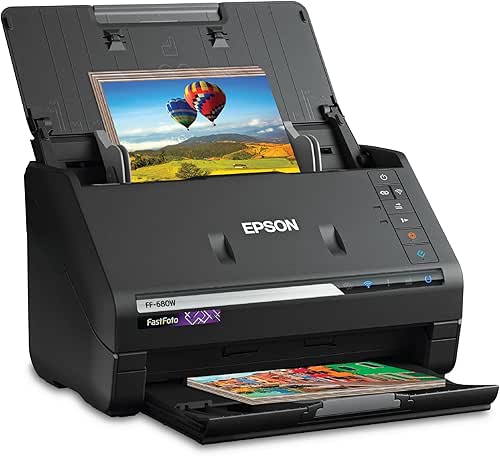
Photo Preservation and Enhancement Features
Building on its impressive speed, the Epson FastFoto FF-680W also excels in photo preservation and enhancement features that elevate your scanning experience. With its Perfect Picture Imaging System, you can easily perform photo restoration tasks like color restoration and red-eye reduction. The scanner’s auto enhancement capabilities guarantee that your images retain their original vibrancy. Furthermore, its Single-step Technology captures both images and any handwritten notes on the back, preserving the context of your memories. This combination of features not only enhances your scanned photos but also protects them for future generations, making it an invaluable tool for photo enthusiasts.
Versatile Scanning Options
Although many scanners limit you to a single format, the Epson FastFoto FF-680W offers a range of versatile scanning options that cater to various needs. You can choose from different resolutions, like 300 dpi for easy sharing, 600 dpi TIFF for archiving, or 1200 dpi for enlargements. This user-friendly design guarantees scanning flexibility, as it accommodates multiple photo sizes in one batch. Additionally, the capability for mobile scanning at up to 600 dpi JPEG allows you to capture images on the go. With these options, the FastFoto FF-680W meets diverse requirements, making it an excellent choice for all your scanning tasks.
Document Scanning Capabilities
The Epson FastFoto FF-680W excels not only in photo scanning but also in its document scanning capabilities, making it a versatile tool for both personal and professional use. You can scan a variety of document types, including contracts, receipts, and reports, with impressive speeds of up to 45 pages per minute. Its scanning accuracy is enhanced by the included Epson ScanSmart software, which features optical character recognition (OCR) to convert scanned images into editable text. This efficiency and precision empower you to manage your documents effectively, ensuring that important information is easily accessible and organized.
Connectivity and User Experience
When it comes to connectivity and user experience, the Epson FastFoto FF-680W offers multiple options that enhance its usability. You’ll appreciate the user-friendly interface, which simplifies the scanning process. The wireless setup is straightforward, allowing you to connect via Wi-Fi with ease through the Epson FastFoto app. This flexibility lets you place the scanner anywhere in your home or office without being tethered to a computer. Additionally, auto-upload features for Dropbox and Google Drive streamline your workflow, ensuring your images are backed up effortlessly. Overall, these connectivity options markedly improve your experience while using the FastFoto FF-680W.
Final Thoughts on the Epson FastFoto FF-680W
With its impressive scanning capabilities and user-friendly connectivity, the Epson FastFoto FF-680W stands out as a top choice for both casual users and photography enthusiasts. User experience is enhanced by its ability to quickly batch-scan multiple photos and the seamless integration with cloud services. User feedback highlights the scanner’s effectiveness in photo restoration and enhancement, making it a valuable tool for preserving memories. Its flexible scanning options cater to various needs, while the robust software support further solidifies its appeal. Overall, the FastFoto FF-680W delivers a powerful combination of speed, quality, and convenience for all your scanning tasks.

What Types of Photos Can the Epson Fastfoto FF-680W Scan?
The Epson FastFoto FF-680W can scan various photo types, including Polaroids, panoramas, postcards, and standard photos up to 8 x 10 inches. Its scanning capabilities allow you to capture multiple sizes simultaneously, guaranteeing flexibility for your projects. With features like auto enhancement and color restoration, it guarantees your images look their best. Whether you’re preserving cherished memories or digitizing old collections, this scanner effectively meets your diverse photo scanning needs.
How Does the Auto-Upload Feature Work With Cloud Services?
The auto-upload feature simplifies your workflow by seamlessly integrating with cloud services like Dropbox and Google Drive. Once you scan your photos, the auto-upload functionality automatically saves them to your chosen cloud storage, ensuring your images are backed up without extra steps. You just need to set up your preferences via the Epson FastFoto app, and you’ll enjoy hassle-free access to your scanned images from any device connected to the internet.
Can I Use the Scanner Without a Computer?
Yes, you can use the scanner without a computer. It features mobile scanning capabilities, allowing you to directly scan photos and documents to your smartphone or tablet. This flexibility enhances your scanning experience, as you can upload images to cloud services or store them on your device. You’ll benefit from the scanner's advanced features, such as auto-enhancement and multiple format options, making it easy to preserve your memories on the go.
How Does the Safetouch Technology Protect Delicate Photos?
SafeTouch Technology protects delicate photos by minimizing contact during the scanning process, ensuring photo preservation and scanning accuracy. This technology employs a gentle handling mechanism that reduces the risk of damage, making it ideal for fragile images. With built-in features like a carrier sheet, it keeps your photos secure while scanning. You can confidently scan everything from old prints to fragile postcards, knowing that your memories are in safe hands throughout the process.
Is There a Warranty or Customer Support for the Scanner?
Yes, there’s a warranty and customer support for the scanner. Typically, you’ll find a one-year limited warranty covering parts and labor. It's essential to check the specific warranty details in your user manual or on the manufacturer’s website for any additional options. For customer support, you can access online resources, FAQs, and contact support via phone or chat, ensuring you get assistance whenever needed for any queries or issues with your scanner.